Category: Wordpress

  • How Much Do You Pay Someone to Design a Website?

    How Much Do You Pay Someone to Design a Website?

    Web design can seem intimidating, especially for those just starting out. Yet, with the right guidance, even beginners can create websites that are both visually appealing and user-friendly. Your website is often the first impression visitors have of your brand or business, so creating a professional, welcoming space is essential. Luckily, web design has foundational principles that help newcomers achieve a polished look and smooth functionality, even with limited experience. For more insights into the cost of hiring a professional, check out Catdi Printing’s guide on website design pricing. Whether you’re building a website for personal use or launching one for a business, these seven essential tips will help you create a site that attracts users, communicates effectively, and encourages meaningful engagement. Let’s dive into the basics of web design and discover how to set up a site that impresses from the start.

    Understanding Website Design Costs

    Here at Catdi Printing, we understand that website design is not a one-size-fits-all service. Factors such as the type of website, its functionality, and the skills required from the designer or agency can all influence the final cost. From DIY platforms to high-end agencies, let’s explore how these different options shape the price. This is why we offer various tiers to fit most of the budgetary needs of small and medium-sized businesses.

    Why Website Design Costs Vary

    When considering how much you’ll pay to design a website, it’s essential to understand the cost-driving factors. Knowing what goes into a site’s design will not only help you set a realistic budget but will also ensure that you get the most value for your investment.

    Complexity and Features

    One of the primary determinants of cost is the complexity of the website. A basic informational site with a few pages is much simpler—and therefore cheaper—to design than a complex e-commerce or membership site that requires custom features and user accounts. If your site needs special functionalities, such as appointment booking systems, e-commerce integration, or custom content management systems, expect the cost to rise.

    Quality and Uniqueness of Design

    While some businesses are fine with pre-made themes, others seek a custom-designed website that aligns perfectly with their brand. Custom designs allow a more unique look and feel but are generally more expensive than template-based designs. Custom websites crafted by experienced agencies, use custom WordPress solutions, and tend to deliver a high-end, professional aesthetic that’s distinctively tailored to the client.
    Who Designs Your Website Matters

    The expertise and experience of the person or team designing your website play a significant role in the cost. From DIY platforms to hiring a professional agency, each option has its advantages, pricing, and limitations.

    Typical Price Ranges for Website Design

    Website design services can be broadly categorized based on budget and complexity. Let’s explore the general price ranges you can expect in the current market.

    DIY Website Builders: $0 – $300

    For those looking to keep costs minimal, DIY website builders such as Wix, Squarespace, or even WordPress offer affordable options. These platforms allow you to create a basic website by using pre-made templates. While cost-effective, DIY solutions often lack the level of customization and professionalism that a business site demands.

    Freelance Designers: $500 – $5,000+

    Freelancers offer a middle-ground option for small business owners looking for more customization without the higher costs associated with agencies. Freelance pricing varies widely based on the designer’s experience and project complexity. However, working with a freelancer might lack the accountability and long-term support offered by an agency.

    Small to Medium Agencies: $3,000 – $15,000+

    Small to medium agencies provide a team approach to design, typically including project managers, designers, and developers. They often deliver custom solutions that are well-optimized for SEO and user experience, which is crucial for a business’s online presence. We offer tailored web design packages that cater to different business needs, from informative small business sites to comprehensive e-commerce platforms.

    Large Agencies or Complex Projects: $20,000 – $100,000+

    At the top of the pricing spectrum are large agencies that handle complex, enterprise-level projects. This price range is often necessary for companies needing custom web applications, high-level security features, and seamless integration with existing business software. Such projects require extensive planning and collaboration, making them a significant investment for established businesses.

    Factors That Impact Website Design Costs

    When evaluating website design costs, it’s essential to consider various factors that influence the final price tag. Let’s break down the key elements that contribute to the cost and help you understand where your investment is going.

    1. Project Scope and Requirements

    The scope of a website project can vary greatly depending on the number of pages, types of features, and depth of content. For example, an e-commerce site with hundreds of products, customer accounts, and payment gateways will require significantly more work than a basic informational website. Every additional feature, such as social media integration or an online booking system, can increase the overall cost.

    2. Design Quality and Branding Needs

    If you want a unique, high-quality website that reflects your brand, you’ll likely need a custom design. This option is more expensive than using pre-made templates but ensures that your website stands out. For instance, companies looking for a cohesive brand experience may choose an agency specializing in custom WordPress websites for maximum flexibility and alignment with their brand identity.

    3. Content Development and SEO Integration

    While some businesses may already have well-crafted content, others might need a professional touch to develop engaging copy. Professional content writers or SEO specialists can make a substantial difference in your website’s performance, helping it rank better on search engines. Most design companies offer basic SEO as part of their web design services, ensuring your site not only looks good but also performs well in search results.

    4. Developer Expertise and Experience Level

    The expertise and experience of the developer or agency can also influence the price. A highly skilled developer or designer brings advanced knowledge and skills to the project, such as in-depth understanding of user experience (UX) and advanced coding techniques. While experienced professionals might charge more, they often provide better results that can benefit your business long-term.

    5. Mobile Responsiveness and Cross-Browser Compatibility

    With more users browsing on mobile devices, having a responsive, mobile-friendly design is essential. Developers must ensure the site functions seamlessly across various devices and browsers, a factor that adds to the project’s complexity. A design that’s fully responsive and cross-browser compatible may cost more upfront but provides a seamless experience for all users.

    6. Additional Features and Integrations

    Depending on your business needs, you may require additional integrations, such as email marketing platforms, CRM systems, or inventory management tools. Each of these features adds time and cost to the project, so it’s essential to discuss your requirements upfront. Catdi Printing, for example, is known for offering web design solutions that incorporate direct mail and printing options for a fully integrated marketing approach, giving businesses a competitive edge in both digital and print spaces.
    Pros and Cons of DIY vs. Hiring a Professional

    Once you have an understanding of the factors impacting costs, the next question becomes: should you build your website yourself or hire a professional? Let’s look at the pros and cons of each option.

    DIY Website Design: The Affordable but Limited Approach

    Pros

    • Low Cost: DIY website builders like Wix and Squarespace are budget-friendly.
    • Quick SetupMany templates are drag-and-drop, making it easy to make a website quickly.
    • Control Over Edits is essential for effective website maintenance.You have control over updates and minor adjustments to your business website.

    Cons

    • Limited Customization: DIY options often lack the flexibility to create unique, branded designs.
    • Lower SEO Performance: DIY platforms are not always optimized for SEO, which could affect your site’s ranking.
    • Creating a custom website can be time-consuming but is worth the investment.: Even with templates, building a website requires a significant time investment.

    Hiring a Professional: Higher Cost, Higher Quality

    Pros

    • Customization: Professionals can create custom designs aligned with your brand.
    • SEO Optimization: Many agencies offer SEO-optimized designs, boosting your site’s search performance.
    • Advanced Features: Professionals can integrate complex functionalities such as e-commerce, booking systems, and CRM integrations.

    Cons

    • Higher Cost: Professional services are generally more expensive.
    • Dependency on a web designer can increase the overall cost to build your website.: You may need ongoing support from the designer for updates and changes.

    Choosing the Right Web Design Service for Your Business

    With a wide range of options available, how do you choose the best web design service for your business? Here are some key considerations to help guide your decision on the average cost of a business website.

    Define Your Budget

    Understanding your budget is crucial when selecting a web design service. Are you looking for a simple, functional website to showcase your portfolio, or do you need an extensive e-commerce platform? Clarifying your needs can help you decide whether a DIY solution, freelancer, or agency is the best fit.

    Identify Your Business Needs

    Consider your business goals and how your website will support them. Do you need a website that allows users to book appointments or make purchases online? Or do you want a site that highlights your portfolio and encourages users to contact you? Identifying these requirements will help you communicate clearly with designers and ensure they understand your project scope.

    Research Potential Web Design Partners

    Take the time to research potential web design partners and their portfolios. Look for examples of their previous work and see if their style aligns with your brand. For example, Catdi Printing offers a range of web design services suited to various industries, providing businesses with an extensive online presence that integrates smoothly with print marketing needs.

    Consider the Long-Term Value of Professional Design

    Investing in a professional web design is a strategic decision that can pay off in the long run. A well-designed, user-friendly website can attract more customers, improve search rankings, and strengthen your brand image. While the upfront cost may be higher, the return on investment (ROI) from a professional design can often outweigh the initial expense.

    Additional Costs to Consider Beyond Website Design

    When budgeting for a website, it’s essential to consider other costs beyond the initial design. While a professionally designed site can provide a strong foundation, there are several ongoing and additional expenses to keep in mind for maintaining and growing your online presence.

    1. Domain and Hosting Fees

    Most websites require both a domain name and web hosting. Domain names typically cost between $10 and $50 per year, depending on the domain’s popularity and provider. Web hosting costs vary, ranging from a few dollars per month for basic plans to hundreds for dedicated servers. It’s important to choose a hosting provider that offers good uptime, speed, and customer support to ensure your site remains accessible and performs well.

    2. Ongoing Maintenance and Updates

    Websites require regular updates and maintenance to keep them secure and functioning smoothly. This includes updating plugins, fixing bugs, and ensuring compatibility with the latest web browsers and devices. While some small business owners may handle minor updates themselves, larger businesses may benefit from a maintenance plan provided by their web design agency or a separate provider.

    3. Search Engine Optimization (SEO)

    If you want your website to rank well on search engines, SEO is a must, and it can impact the overall cost to build your site. Many design agencies, including Catdi Printing’s Houston-based services include competitive pricing for custom website solutions., offer SEO as an add-on to their web design packages, ensuring your site is optimized from day one. Ongoing SEO efforts, such as content updates, backlinking, and performance optimization, can improve your site’s ranking over time, but these services often come with a monthly or project-based fee.

    4. Content Creation and Updates

    A successful website is rarely static; regular content updates keep your audience engaged and support SEO. From blog posts to product descriptions, having fresh, relevant content helps improve your site’s visibility and provides value to your audience. Content creation can be handled in-house or outsourced to a professional content writer, with costs varying based on the length and frequency of updates.

    5. E-commerce Functionality and Payment Processing

    For businesses with online stores, e-commerce functionality adds an extra layer of complexity and cost. In addition to integrating payment processors, e-commerce websites often need product catalog management, inventory tracking, and secure payment gateways. Payment processing fees also apply to each transaction, with rates typically around 2-3% of the sale.

    Calculating the Return on Investment (ROI) of Website Design

    Investing in website design isn’t just about creating a digital space; it’s about generating value for your business. A well-designed website can drive conversions, build brand loyalty, and enhance customer experience, which all contribute to a positive return on investment.

    Evaluating the Benefits of Professional Design

    Professional design can enhance user engagement by providing an intuitive, aesthetically pleasing experience. Visitors are more likely to trust and engage with a polished and professional business website, and this trust can translate into more leads or sales. Additionally, sites that are SEO-friendly have better chances of attracting organic traffic, helping your business reach a broader audience without paying for ads, which can lower your overall website cost.

    Measuring ROI Through Analytics

    After launching your website, tracking key metrics such as user engagement, bounce rate, and conversion rate is essential for measuring ROI. These insights help determine whether the site effectively meets your goals and identifies areas for improvement. Google Analytics, for instance, provides detailed metrics on how visitors interact with your site, allowing you to assess the impact of professional design on your business outcomes.
    Making the Most of Your Website Investment

    To maximize your website investment, consider it as part of a broader marketing strategy rather than a standalone project. Integrating digital marketing efforts, such as SEO, email marketing, and social media, can help drive traffic to your site and improve its performance over time.

    Aligning Website Design with Business Goals

    Whether you’re a startup or an established business, your website should align with your broader business goals. For instance, if your goal is lead generation, focus on creating clear calls-to-action (CTAs) and easy-to-navigate pages that guide users toward contacting you or making a purchase.

    Leveraging Multi-Channel Marketing

    Combining your website with other marketing channels, like social media and print marketing, can increase brand visibility and engagement. As a company experienced in both digital and print services, Catdi Printing can provide a holistic approach to website maintenance, allowing businesses to create a cohesive strategy that spans both web and print.

    Final Thoughts: Finding the Right Balance Between Cost and Value

    The average cost of website design varies widely based on project complexity, design quality, and functionality requirements. While it’s tempting to opt for the cheapest option, investing in a professional, well-designed website often pays off in the long run through better user engagement, SEO, and business growth.

    Choosing the right web design partner is crucial, as this decision impacts both the look and performance of your site. Partnering with a reputable agency like Catdi Printing ensures that your site is visually appealing and built with business growth in mind, offering a range of design options tailored to meet various budgets and needs.

    Closing Thoughts on Website Design Costs

    Investing in a quality website is a significant decision, but one that can bring immense value to your business. By understanding the factors influencing costs and carefully choosing a design partner, you can create a website that not only represents your brand but also drives meaningful results. In today’s competitive market, a professionally designed website is more than just a digital asset—it’s an essential part of your business’s success.
  • 6 Essentials Of An Effective Landing Page

    6 Essentials Of An Effective Landing Page

    Digital marketing has become a cornerstone of success for many businesses. The success of a digital marketing campaign often hinges on the landing page’s effectiveness. A landing page is more of a webpage where visitors land after clicking on a link from an advertisement or email. Remember that an effective landing page can drive conversions and sales. For this reason, this article will discuss the six essential factors to consider when creating an effective landing page for your business.

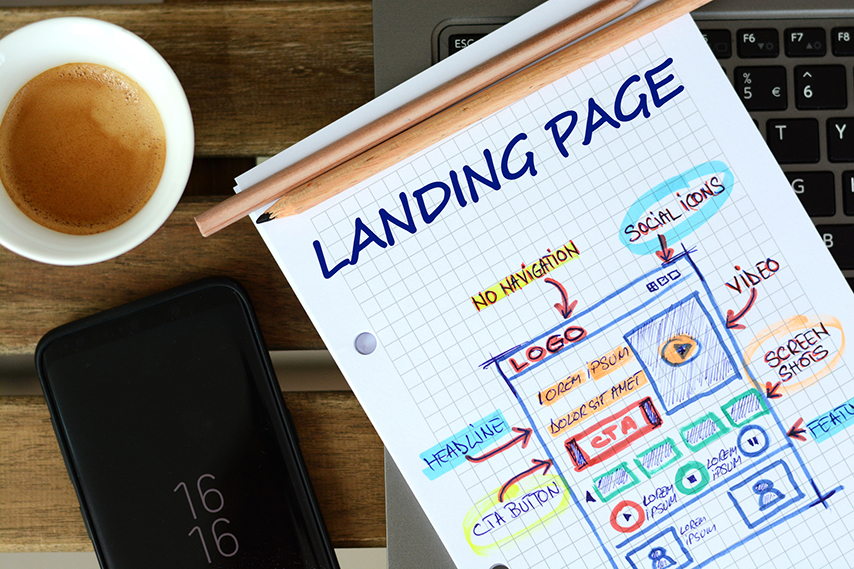
    • Have A Clear And Concise Headline 

    If you quickly dive into some of the best website designs in Houston, one thing that will stand out is the attention to detail when creating effective headlines for landing pages. A headline is the first thing a visitor sees and sets the tone for their entire experience on the page. A clear and concise headline is essential because it grabs the reader’s attention, provides an immediate understanding of what the page is about, and entices the reader to keep reading.

    For example, if you’re creating a landing page for a new service, a good headline is ‘Unlock the Power of Our New Service.’ This headline gives an immediate understanding of the service is and its potential benefit. It also creates a sense of anticipation and curiosity to learn more. In addition, the headline should also be concise so that it only takes up a little space and does not overwhelm the reader. It must be understandable to the average reader and effectively convey the page’s message.

    • Add Customer Testimonials  

    Customer testimonials are an essential element of any successful landing page. They help increase trust in your product or service and demonstrate to potential customers the value of your offer. Testimonials from real customers provide social proof that your product or service is worth their time and money. This helps build trust and credibility with your audience, which is crucial to attracting customers.

    Additionally, you can use customer testimonials to highlight the features and benefits of your offering and provide a more engaging experience for visitors. Introducing customer testimonials on your landing page can help demonstrate your product’s or service’s value, build trust, and ultimately attract more customers.

    • Have An Engaging Visual Or Video 

    With the many businesses opening in Houston, websites have become an integral marketing strategy for most businesses. As such, landing pages are essential in providing users with an introduction to your service or product and an easy way to navigate to other areas of your website. Engaging visuals and videos on your landing page are essential to capture potential customers’ attention effectively.

    Visuals are more likely to draw the user’s attention and create an emotional connection with your service or product. Videos can explain the benefits of your product or service and provide a personal touch to the website. To effectively introduce visuals and videos on your landing page, it’s essential to ensure they have a clear purpose.

    For example, you could use visuals to highlight the features of your product or service or to demonstrate how it works.

    • Have A Strong Call To Action 

    A solid call to action is crucial to any successful landing page. It encourages visitors to take the desired action, such as downloading a free eBook, subscribing to your latest newsletter, or buying a product. Without a clear call to action, visitors may become confused and leave the page without taking action.

    Furthermore, adding a solid call to action to your landing page will motivate visitors to take the desired action. It should be clear and concise and should stand out on the page. It would be best to place it prominently, so visitors are more likely to see it. Additionally, adding a sense of urgency can help visitors take action immediately.

    For example, including phrases such as ‘Download Now’ or ‘Sign Up Today’ can encourage visitors to take action. Overall, including a strong call to action on your landing page can help to increase conversions and generate more leads.

    • Add A Form To Capture Leads 

    The primary purpose of creating a landing page is to capture leads and grow your customer base. Adding a form to your landing page helps make your page stand out by providing visitors with an easy and convenient way to contact you. To maximize the effectiveness of your form, consider adding fields that ask for basic contact information such as name, email, phone number, and address.

    You can also add questions that assess the needs of your visitors, such as their industry or preferences, so you can better tailor your services to them. Lastly, you can include an opt-in box for visitors to register for your mailing list or newsletters, so you can keep them informed of your latest news and offers.

    • Social Proof 

    Recently, social media has become an increasingly important part of any successful digital marketing strategy. By adding your social media account to your landing page, you can reach a wider audience and significantly increase the effectiveness of your page. Social media allows you to speak directly with potential customers, build relationships, and showcase your brand in a much more engaging way than traditional marketing.

    As a result, you can increase your brand visibility, build trust, and encourage leads to convert. Moreover, social media provides valuable data such as customer feedback and insights that can help you improve customer experience and optimize your product or service. Overall, the benefits of social media make it an invaluable tool for any landing page.

    Conclusion  

    An appealing landing page is the number one secret to success in digital marketing. By following these seven essential steps, you can create a compelling and engaging landing page that’ll help drive conversions and generate more leads. These elements are critical in a successful landing page, from having a clear and concise headline to adding social proof. Following the tips explained in this article, you can create the perfect landing page for your business and increase your online visibility.

  • 7 Web Design Tips For Beginners

    7 Web Design Tips For Beginners

    Web design can seem intimidating, especially for those just starting. With the right guidance, however, even beginners can create appealing, user-friendly websites. Whether you’re building a website for yourself or for a business, these foundational tips will help you set up a site that looks professional and delivers a great user experience. Here are seven essential web design tips to get you started!

    1. Focus on a User-Centric Design

    One of the first steps to effective web design is to put yourself in the users’ shoes. A user-centric design prioritizes the needs and behaviors of your visitors, making the site intuitive and enjoyable to navigate. A website should be easy to use, allowing visitors to find the information they need quickly. Start by mapping out what users expect to see when they land on your site. A good rule of thumb in website design is to keep layouts clean and focused, reducing clutter and guiding users through your site effortlessly.

    Catdi Printing’s web design services offer a great example of presenting information clearly, guiding visitors to essential sections without overwhelming them. When simplicity is done right, it encourages user engagement and increases the chances of them taking action—whether that’s contacting you, making a purchase, or signing up for a newsletter.

    Why User-Centric Design Matters

    User-centered design enhances the user experience, which directly affects how long visitors stay on your site. With too many elements or overly complicated layouts, users can feel lost and may leave quickly. Aim to create a layout that supports seamless navigation, and you’ll likely see higher engagement and conversions.

    2. Keep Navigation Simple and Intuitive

    An intuitive navigation structure is vital for a smooth user experience. Visitors should be able to access different pages on your site without getting lost. Use a straightforward menu, typically placed at the top of the page, to guide users to essential areas, such as “About,” “Services,” and “Contact” sections. It’s also helpful to add links in the footer to commonly visited pages for users who scroll down.

    Think of navigation as the backbone of your site’s structure. Simplified navigation is key to keeping visitors on your site longer and encouraging them to explore further. A pro tip is to avoid overloading your main menu with too many options; instead, use dropdowns for subcategories or secondary links.

    Footer Navigation as a Supplement

    The footer is an often-overlooked area that can enhance navigation. By adding links to critical pages at the bottom of each page, you provide a secondary, easy-to-access navigation path. For instance, adding social media links, a “Privacy Policy,” or “Terms and Conditions” in the footer can help users find additional information they may be looking for, enhancing the overall accessibility of your site.

    3. Use Responsive Design for All Devices

    In today’s mobile-first world, having a responsive website is a must. Responsive design means your website adapts to various screen sizes, from smartphones to tablets to desktop computers, ensuring a consistent experience for all users. Not only does this improve usability, but it also benefits SEO, as search engines like Google favor mobile-friendly sites.

    Responsive design has become standard in modern web development, allowing users to interact with the same website seamlessly on any device. For beginners, using responsive frameworks or themes is an efficient way to design a website that is mobile-friendly without Custom website design allows you to create a unique identity for your brand. coding.

    The Impact of Mobile Responsiveness on SEO

    Mobile responsiveness goes beyond aesthetics—it has a direct impact on your site’s search engine ranking. Google favors mobile-friendly websites, so having a responsive design can be the difference between a higher or lower position in search results. For more insights into the benefits of responsive web design, check out resources like Catdi Printing’s web design guide, which emphasizes why responsiveness is crucial for modern businesses.

    4. Prioritize Readability and Typography

    Good typography can elevate a website’s design, making content easy to read and visually appealing. Choose simple and professional fonts for the body text and reserve more stylized fonts for headings or titles. Limit the number of font types to maintain a cohesive look; typically, two or three fonts are sufficient. Additionally, ensure adequate contrast between text and background colors so that your content remains accessible to all readers.

    For instance, sans-serif fonts like Arial or Helvetica are often ideal for body text due to their legibility, while a more decorative font might work well for titles or brand elements. Font size also matters—body text should generally be between 16px to 18px to ensure readability across devices, which is one of the best practices in web design.

    Enhancing Readability with Line Spacing and Contrast

    Spacing plays a key role in readability. Use adequate line spacing (usually 1.5 or more) to give text room to breathe. Contrast is another factor; high contrast between text and background improves readability, especially on smaller screens. Remember, readability directly impacts how long visitors stay engaged with your content, so choose fonts and colors that enhance the reading experience.

    5. Use Color Wisely to Reflect Your Brand

    Just like in printing, color in web design is a powerful tool that extends beyond aesthetics to set the tone and mood of your brand, influencing how customers perceive and interact with it. Thoughtful color choices communicate your brand’s personality and values and can even evoke specific emotions. When selecting a color scheme, it’s often best to stick with a few core colors—ideally, those already associated with your brand and logo—to maintain a cohesive and recognizable look without cluttering the design. Each color has its own psychological impact: blue conveys trust and professionalism, while green suggests growth and nature.

    If you’re unsure of where to begin, many web design tools provide pre-set, visually balanced color schemes. For brand-specific sites, always refer to your brand guidelines to ensure consistency. Thoughtful color choices can enhance the overall design and create a strong, memorable impression for your audience.


    Color Psychology and User Interaction

    Color also affects how users interact with your website. For example, using a bold color for call-to-action (CTA) buttons can make them more noticeable and increase click-through rates. Colors can evoke emotions and influence users’ decisions subtly; thus, a well-thought-out color palette can lead to better engagement and conversions.

    6. Add Visual Elements to Engage Visitors

    Visual elements like images, illustrations, and videos can make your website more engaging and visually interesting. High-quality visuals draw users in, helping them understand your brand or message more effectively. Instead of relying solely on stock images, which can feel generic, consider using original photos or custom illustrations that reflect your business’s identity.

    Including images of your team, products, or real-life scenes related to your industry can foster a connection with users. When images are used strategically, they not only break up text-heavy sections but also improve the overall user experience. However, ensure that visuals do not overwhelm the site; they should complement the content, not distract from it.

    Optimizing Visuals for Faster Loading

    While visuals add appeal, they can also slow down your website if not optimized correctly. Large image files can increase loading times, negatively impacting the user experience and SEO. To avoid this, compress images without sacrificing quality, use next-gen formats like WebP, and set up lazy loading for images below the fold. These optimizations make your site faster and improve the browsing experience, especially for users on mobile devices.

    7. Maintain Consistency and Balance Throughout Your Design

    Consistency is key to creating a cohesive and professional website. This means maintaining uniformity in color schemes, typography, and layout across all pages. Each element on your website should complement the others, creating a balanced and harmonious appearance. Consistency builds trust with users by creating a predictable and reliable browsing experience.

    Another important aspect of balance is the use of white space. Allowing adequate space around content, images, and buttons ensures that each element can “breathe,” making the site feel open and uncluttered. White space in website design helps direct focus and guides users to the most important areas of the page, such as calls-to-action or key content.

    Building Unity with Consistent Design Patterns

    Using consistent design patterns across your website enhances the user journey. Design elements like button styles, icon usage, and font choices should follow a pattern to maintain visual continuity. For inspiration on how to apply these principles effectively, refer to Catdi Printing’s custom web design services, where attention to detail ensures each website is cohesive and easy to navigate.


    Additional Tips for Website Maintenance and Improvement

    Now that you’ve established a strong foundation with the basics of web design, maintaining and improving your website over time is crucial. Regular updates and maintenance help keep your website fresh, secure, and aligned with current design trends. Let’s go over some essential maintenance tips that will keep your site running smoothly and enhance your design skills as you grow.

    1. Keep Content Updated and Relevant

    Fresh content is more than just an engagement tool—it’s a powerful signal to search engines that your website is active, relevant, and up-to-date; by regularly refreshing key pages, like “About Us” and “Services,” you ensure that your online presence reflects any recent changes in your offerings or brand. Adding a blog section can further enrich your site by providing a space to share valuable insights, industry updates, or timely tips with your audience.

    However, to maintain this frequency of updates, having a user-friendly content management system (CMS) is key, and this is where WordPress shines. WordPress allows businesses to quickly and easily update content without requiring extensive technical knowledge. This ease of use makes it simpler to add fresh articles, update service descriptions, and optimize pages to keep your content relevant and engaging.

    Incorporating high-quality, SEO-optimized content is crucial. It not only helps your site rank better in search engine results but also makes it easier for potential customers to find you. Balancing keywords naturally within the text is essential—quality content that feels genuine resonates better with audiences and search engines alike.

    If you’re looking for inspiration on how to create engaging, search-friendly content, check out Catdi Printing’s web design blog. They cover a range of valuable topics in a way that resonates with their audience, showing how consistent, thoughtful updates can make a difference.


    2. Conduct Regular Design and Performance Audits

    As your website grows, it’s essential to evaluate its performance periodically. Conducting design and performance audits helps identify areas for improvement, such as slow-loading pages, broken links, or design elements that no longer align with your brand.

    Page load speed is especially important, as slow-loading sites can lead to higher bounce rates. Use tools like Google PageSpeed Insights or GTmetrix to analyze your site’s loading times and identify optimization opportunities. By keeping your site fast and user-friendly, you can improve both user satisfaction and search engine ranking.

    3. Stay Up-to-Date with Design Trends

    Web design is an evolving field, with trends changing frequently. Staying updated on the latest design trends can keep your site looking modern and relevant. While not every trend will suit your brand, experimenting with new ideas can help keep your website fresh and engaging. Elements like micro-animations, dark mode options, and minimalist layouts are some examples of current trends that can enhance user experience without overwhelming the design.

    However, always prioritize usability and brand consistency over blindly following trends. Your website should be a reflection of your brand’s personality, and every design choice should have a clear purpose. If you’re ever unsure about which trends align with your brand, consider consulting professionals, as Catdi Printing’s design team does for their clients, ensuring every design decision adds value.


    The Importance of Learning and Growing as a Beginner Designer

    As a beginner in web design, continuous learning is essential to refine your skills and stay competitive. Embrace feedback from users, clients, or mentors to gain insight into areas where you can improve. Whether it’s mastering new design software, learning basic coding skills, or studying user experience principles, investing time in skill-building will make you a more versatile designer.

    Utilize Online Resources and Communities

    Many resources and communities are dedicated to helping beginners in web design. Platforms like YouTube, online courses, and forums such as Reddit’s r/web_design offer tutorials and advice from experienced designers. Networking with other designers can provide inspiration, solutions to common challenges, and tips for improving your work.

    Practice with Real Projects

    Practical experience is one of the best ways to grow your skills. If possible, work on personal or volunteer projects to gain hands-on experience. Experimenting with different design elements, layouts, and tools will build your confidence and help you develop a style that resonates with users. Over time, you’ll be able to tackle more complex projects, creating websites that not only look good but are also user-friendly and functional.

    Final Thoughts: Building a Foundation in Web Design

    Starting in web design can be challenging, but by following these foundational tips, beginners can create functional, visually appealing websites that engage users and build credibility. From focusing on user-centered design to keeping content fresh and relevant, each step you take contributes to a stronger online presence for your brand or business.

    Whether you’re designing a personal site or working with clients, these beginner tips will serve as a strong starting point. As you grow, don’t hesitate to seek guidance from seasoned professionals, experiment with new trends, and continue improving your skills. A well-designed website is an investment that pays off, not just in user engagement but also in brand credibility and business growth.

    Remember, each design decision impacts how users perceive and interact with your site. By following these tips and continually refining your craft, you’ll be well on your way to becoming a skilled web designer capable of building sites that make a lasting impression.

  • 5 Major Types of Landing Pages

    5 Major Types of Landing Pages

    The right landing page can keep visitors on your website longer and convert them into paying customers more often. But landing pages are only effective as its quality and how well it aligns to the company’s core objectives. 

    Different objectives require different types of landing pages, and knowing what the major types of landing pages are and when they should be used is key to finding a landing page template that delivers. Check out these major types of landing pages to help you determine which will work best for you.

    1. Product Landing Page

    Your website’s home page is meant to provide an overview of your business and products, as well as have links for those seeking more detailed information. Due to this broad goal, a home page may not be the best place to direct visitors who have come to your website in response to a campaign around a specific product. A product landing page is a better destination for that.

    The product landing page strategically displays the product in question to the audience. It typically features images, videos, product descriptions and how-to guides, all capturing the product’s details. Anyone clicking on the product ad on third party websites, social media and elsewhere on your website should land on the product landing page.

    2. Squeeze Page

    The squeeze page is a means of collecting email addresses from incoming visitor traffic. With an email address, you can create a deeper connection with prospects by disseminating engaging content and persuasive product promotions. Squeeze pages usually have a simple design and include a convincing call-to-action (CTA) button.

    Since you are a business they are probably interacting with for the first time, people are unlikely to provide their email addresses unless you can give them something in return. Through squeeze pages, you can offer whitepapers, ebooks, newsletters, free product trials and more, in exchange for the email address.

    3. Lead Generation Page

    The lead generation page, just like the name implies, is meant to generate leads for your brand promotion or business. While it may have the appearance of a squeeze page, it has a bigger objective of collecting more detailed data from the visitor. Detailed information would often include name, email address, location, designation, company name, industry and company revenue.

    Because you will be collecting much more data than you would with a squeeze page, you have to have a compelling headline and message. Prospects will have to spend a minute or two to fill in this information, so it has to make sense for them. Ensure that you make it clear your website adheres to applicable privacy laws such as the GDPR.

    4. Splash Landing Page

    A splash landing page aims to immediately capture the attention of a visitor. It will usually appear before the person lands on the page they originally clicked on. The splash page is thin on content as it looks to capture visitor attention for less than a minute. 

    Brevity is key on this page, as it isn’t aimed at conversion, but rather meant to announce promotions, webinars or new arrivals. You could also use a splash landing page to confirm visitor age or set language and geography preferences.

    5. Long-Form Sales Landing Page

    The long-form sales landing page is perhaps what many people think of when they imagine a landing page. A permanent fixture of the world wide web for years now, it is the online equivalent of an infomercial. It follows a long-form format written in persuasive wording that directs a prospect into subscribing for a service, or buying a product.

    A long-form sales landing page will contain a mix of product descriptions, benefits, discount codes, testimonials, videos, FAQs and multiple CTA buttons. There is no limit to the length of the page but many are under 5,000 words long to ensure they get the message across without losing the reader’s attention.

    Plan, Then Choose

    Before you create a landing page, set out your strategy, understand your audience and map out your campaign. With that done, you can choose the best type of landing page for your visitors to encounter when they arrive at your site.